Alan Code
an open-source coding agent
A coding agent like Claude Code, in Python, for any model.
Alan Code is an open-source Python implementation of a Claude-Code-like coding agent: the agent loop, tools, permissions and context management, plus cross-session memory, live cost tracking and a browser GUI. It works with hosted APIs (Anthropic directly, or OpenAI, OpenRouter, Gemini and the other providers LiteLLM supports) and with open-weight models served locally (vLLM, SGLang, Ollama, llama.cpp). Use it in a terminal, in a browser, or as a Python library to build your own agents.

Three ways to use it
terminal, browser, library
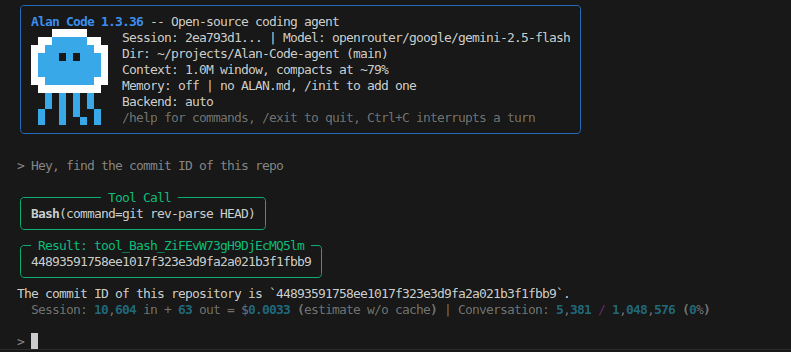
In a terminal, alancode opens a chat: Alan streams its reply, applies the permission policy before each tool, and saves the session so it can be resumed later. Slash commands cover the rest: /compact, /status (model, tokens, cost), /model, /diff, /commit with an AI-written message, /skill, /settings. --print runs a single prompt non-interactively.
alancode                                                 # interactive session
alancode --model openrouter/anthropic/claude-haiku-5.5   # provider/model routing
alancode --model openai/my-model --base-url http://localhost:8000/v1
alancode --gui                                           # browser GUI
alancode --resume                                        # last session
In a browser, --gui starts a local interface with the same agent core. Besides the Chat panel, it has an LLM Perspective panel: the normalized system prompt and conversation as Alan sends them to the backend, which is the view to read when the agent surprises you (why it called a tool, what compaction kept).
In Python, the AlanCodeAgent class exposes the agent as a library, with synchronous, asynchronous and streaming APIs (see Python API).
Every option follows one priority chain: command-line flag, then the resumed session’s snapshot, then the project’s .alan/settings.json, then built-in defaults. Settings can also be changed mid-session with /settings.
The agent loop
iterations, turns, sessions
At its heart is a single async generator, query_loop(). One iteration is one model call, optionally followed by tool execution. A turn is everything between two user messages: one or more iterations until the agent stops. A session is the whole conversation, persisted on disk and resumable.
Each iteration checks for an interrupt, injects reminders, runs the compaction pre-check, verifies the request still fits the context window, streams the model’s response, collects its text and tool calls, and executes the tools: concurrently for read-only tools, one at a time for tools that write or execute. A turn ends when the model answers without calling a tool, when the user interrupts, when max_iterations_per_turn is reached, or on a blocking error.
Three kinds of errors are recovered inside the loop:
- Output-token limit. The cut-off reply stays in the history and a reminder tells the model to split long content over several turns. Tool calls in a cut-off reply never run: they are removed and replaced by one note saying how many calls were cut.
- Prompt too long. An emergency compaction runs, then the call is retried with the summarized history.
- Transient network errors (rate limits, timeouts, overloads) are retried with exponential backoff, and only when no part of the response has been streamed yet.
Tools
what the model can do
Each built-in tool declares a permission level: read (no side effects), write (modifies files in the working directory) or exec (runs external commands).
- Bash
- Runs a shell command. exec
- Read
- Reads a file. read
- Edit
- Exact-string replacement inside a file. write
- Write
- Creates or overwrites a file. write
- Glob, Grep
- Find files by pattern, search file contents by regex. read
- WebFetch
- Fetches a URL and strips its HTML. read
- AskUserQuestion
- The model asks you a multiple-choice question. read
- GitCommit
- Stages and commits with a given message. write
- ViewImage
- Shows an image file to a model that can see, when vision is on. read
- Skill
- Invokes a user-defined skill. read
For models without native tool calling, the same tools are described in the system prompt and their calls parsed from the model’s text (see Local models).
Permissions
when Alan asks first
Whether a tool runs without asking depends on its level and on the session’s permission mode:
| mode | read | write | exec |
|---|---|---|---|
| safe | auto | ask | ask |
| edit (default) | auto | auto | ask |
| yolo | auto | auto | auto |
When a call needs approval you can allow it, deny it (the model is told and can adapt), or type your own answer, which is returned to the model as the tool result. For Bash, allow always records a project-scoped rule on the command’s first word (git *, pytest *) in .alan/allow_rules.json.
For each call, Alan validates the input, runs any pre-tool hook, then goes through the permission pipeline (deny rules, ask rules, the mode’s automatic allowances, explicit allow rules, and finally asking you) before running the tool and its post-tool hooks.
Context and compaction
long sessions in a finite window
Before every model call, Alan estimates the size of the request against a budget: the context window minus room for the response and a safety margin. Three layers keep it within that budget:
- A
Truncate oversized tool results, on every call. Any single output above a size cap is cut in the middle: its head and tail survive, with a marker saying how much was elided.
- B
Clear old tool results, oldest first, when the request has grown well past a compaction threshold (80 % of the budget by default). It stops at a target that stays above the threshold, and the model still sees that each tool was called.
- C
Auto-compact at the threshold. A separate model call, without tools, writes a structured summary that replaces the earlier history; the session then continues from it.
If a call still fails with “prompt too long”, an emergency compaction runs and the call is retried. If summarizing fails repeatedly, Alan deterministically drops the oldest history, keeping the opening and a valid recent tail, so the session stays usable. /compact triggers a summary by hand, and any text after it tells the summarizer what to focus on.
After each turn a status line shows the session’s tokens and estimated cost, and how full the context window is.
Models and backends
how requests reach a model
Alan separates the backend, how a request is transported, from the provider, which service runs the model and which is written in the model string (openrouter/…, ollama/…, gemini/…). The backend is inferred from the model name:
- anthropic-native
- For bare Claude model names. The official Anthropic SDK, with native tool use, streamed thinking blocks and prompt caching: up to four cache breakpoints per request (tools, the stable part of the system prompt, the full system prompt, the conversation).
- auto
- Everything else, through LiteLLM: OpenAI, OpenRouter, Gemini, Vertex AI, Bedrock, Ollama, and any OpenAI-compatible server such as vLLM or SGLang.
- scripted
- Pre-written responses: no network, no cost, deterministic. Used by the test suite, and in a remote variant where another program plays the model over HTTP, to debug a prompt or an integration by hand.
Token usage and an estimated cost are tracked for every call; for Anthropic models the estimate distinguishes cache reads from cache writes.
Local models
open weights, on your own server
Any model behind an OpenAI-compatible API works with --model openai/<name> --base-url <url>: vLLM, SGLang, llama.cpp, or Ollama with its own prefix. Two things usually decide whether a local model behaves as an agent:
Who parses tool calls. If the server has a tool parser, Alan uses native tool calling. If it has none, Alan must extract calls itself: with --tool-call-format it describes the tools in the system prompt and strictly parses calls out of the model’s text, in one of several dialects (hermes, hermes_xml, glm, alan, meta_json, bash_block, kimi, kimi_k3, deepseek, minimax), or auto, which accepts any of them. Server-side and client-side parsing must not both be on: the server would consume markup it half-recognises, and neither side would see a complete call.
The real context window. Every budget derives from it, so Alan reads it from the model registry, the server’s metadata or a one-time probe, and refuses to start rather than guess when all of them fail. --cw sets it explicitly.
Custom endpoints get a long request timeout (one hour) for slow local inference, and a reply that is empty or contains only reasoning gets a few corrective retries before it is reported as an error.
Local and reasoning models
what makes Alan different
Local and reasoning models often need help with the tool format: a model may keep writing after its command, write the command inside its reasoning, or drift from the format. A few settings address this:
- stop_at_first_call
- Under the
bash_blockformat, only a reply’s first command runs, so Alan ends the generation as soon as that command is written, which prevents runaway replies. On by default. - inserted_example_bash_use
- A new session opens with one real example call, written in the model’s own tool format, so the model sees the format in use rather than only its description.
- carry_reasoning_until_call
- A reply that ended without acting keeps its reasoning visible to the model until its next tool call, so it does not start its analysis over.
- run_reasoning_closing_call
- A command written at the very end of the reasoning, with nothing visible after it, still runs. On by default.
- vision
- Models that can see get the ViewImage tool to look at image files.
- get_provenance()
alancode.get_provenance()returns the version, git SHA and dirty flag of the source actually running, for reproducible benchmark logs.
Instructions, memory, skills, hooks
shaping the agent without code
- ALAN.md
- Project instructions loaded into the system prompt at the start of every session, plus global ones in
~/.alan/ALAN.md./initwrites a starter file. - Memory
- Markdown files that persist across sessions, per project and global, indexed by a
MEMORY.md. Off by default;onloads it and writes when asked;intensivealso saves proactively after significant turns. - Skills
- Prompt templates in markdown with a short frontmatter, run with
/skill <name>or chosen by the model through the Skill tool. A skill can restrict the tools available while it is active. - Hooks
- Commands run at lifecycle events (before a tool, after it succeeds or fails, at session start and end), receiving the event as JSON. A pre-tool hook can deny a call, with a message for the model.
Python API
agents on top of the agent
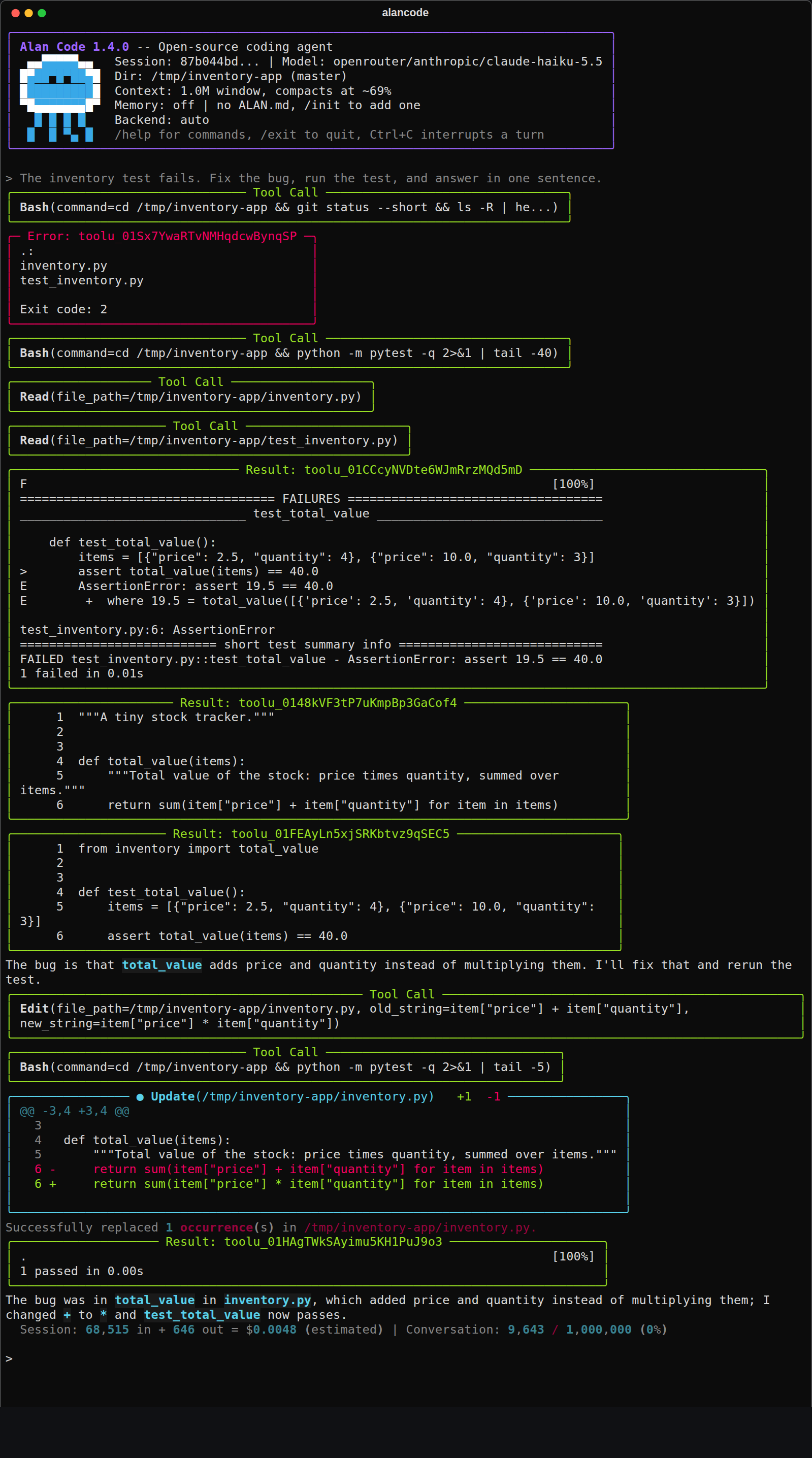
AlanCodeAgent exposes query() and query_async(), which return the final text, and query_events_async(), which streams every event (text deltas, tool calls, tool results, compaction markers). An auto-fix loop takes a few lines:
import subprocess, sys
from alancode import AlanCodeAgent

agent = AlanCodeAgent(model="openrouter/anthropic/claude-haiku-5.5", permission_mode="yolo")
agent.query("Read code_bugged.py and write a fixed version to code_fixed.py.")

for attempt in range(5):
    result = subprocess.run([sys.executable, "test_inventory.py"], capture_output=True, text=True)
    if result.returncode == 0:
        break
    agent.query(f"Tests still fail:\n{result.stdout}\nFix the remaining bugs.")
The constructor takes the same settings as the CLI, and more: the tool set (tools, disabled_tools, extra_tools for your own tools), a replaced or extended system prompt, a callback that answers permission requests, or any custom backend object.
Programmatic mode (programmatic=True) is for when another program drives Alan, such as a benchmark harness or a parent agent. It detaches the agent from host and project state that would contaminate a controlled run: no ALAN.md, no global memory, and no WebFetch, GitCommit, AskUserQuestion or Skill tools.
Each session holds an exclusive lock, so two processes cannot write the same session. Separate agents editing the same source tree should each get their own Git worktree.
Not implemented yet
contributions welcome
Features of modern coding agents that Alan Code does not have yet: subagents, MCP servers, a plan mode, and an active web-search tool. Hooks exist around tool use (PreToolUse, PostToolUse, PostToolUseFailure) and at session start and end, but not yet for stopping or compaction.